Talent Vetting Dashboard

Talent Vetting Dashboard

From Match to Hire in 72 Hours

Who is Wrnly?
Wrnly is a talent-matching and vetting platform designed to disrupt the agonizingly slow traditional hiring process. By exclusively offering pre-vetted talent and highly targeted role matching, Wrnly connects companies with the right candidates, schedules interviews, and finalizes offers—all within 72 hours.

Wrnly is a talent-matching and vetting platform designed to disrupt the agonizingly slow traditional hiring process. By exclusively offering pre-vetted talent and highly targeted role matching, Wrnly connects companies with the right candidates, schedules interviews, and finalizes offers—all within 72 hours.

Wrnly is a talent-matching and vetting platform designed to disrupt the agonizingly slow traditional hiring process. By exclusively offering pre-vetted talent and highly targeted role matching, Wrnly connects companies with the right candidates, schedules interviews, and finalizes offers—all within 72 hours.

Expected to streamline the hiring process and increase the successful match rate by 5% within the first 6 months.
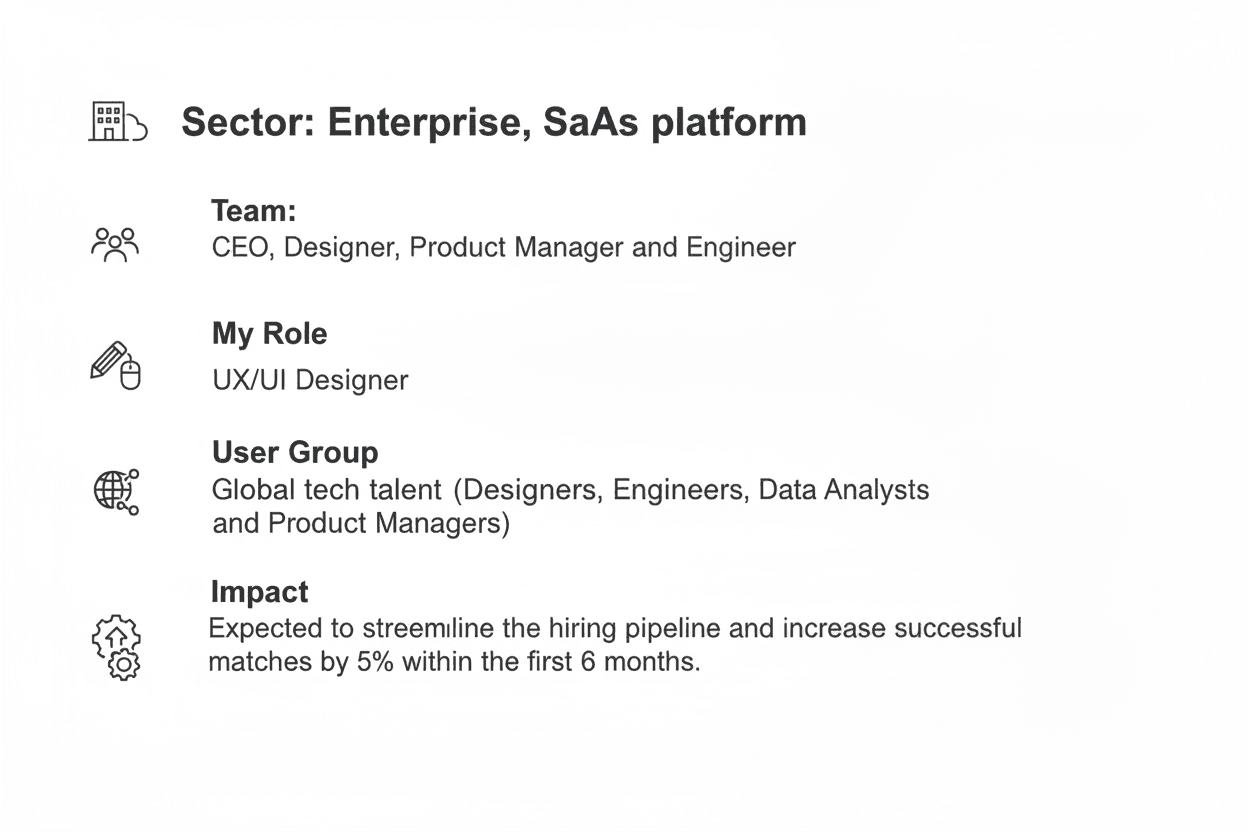
Expected to streamline the hiring process and increase the successful match rate by

5% within the first 6 months.

The Problem…

The Problem…

When I looked at how global hiring usually works, I saw three massive gaps :

When I looked at how global hiring usually works, I saw three massive gaps :

The "Black Hole" Problem

Talent apply and then hear nothing for weeks.They wonder, "Did my application even go through?" It’s a total anxiety-fest.

Scheduling hell

One email to suggest a time, one to say "I'm busy," one to suggest a new time, and another because someone forgot the Zoom link.

Stalled Lives

Talent go through a rigorous 3-week interview only to find out the company is non-negotiable with salary or they hired someone internally.

The "Black Hole" Problem

Talent apply and then hear nothing for weeks.They wonder, "Did my application even go through?" It’s a total anxiety-fest.

Scheduling hell

One email to suggest a time, one to say "I'm busy," one to suggest a new time, and another because someone forgot the Zoom link.

Stalled Lives

Talent go through a rigorous 3-week interview only to find out the company is non-negotiable with salary or they hired someone internally.

The Solution-A Curated Talent Onboarding Flow

The Solution-A Curated Talent Onboarding Flow

Phase 1: Entry & Qualification (Pre-72 Hours)

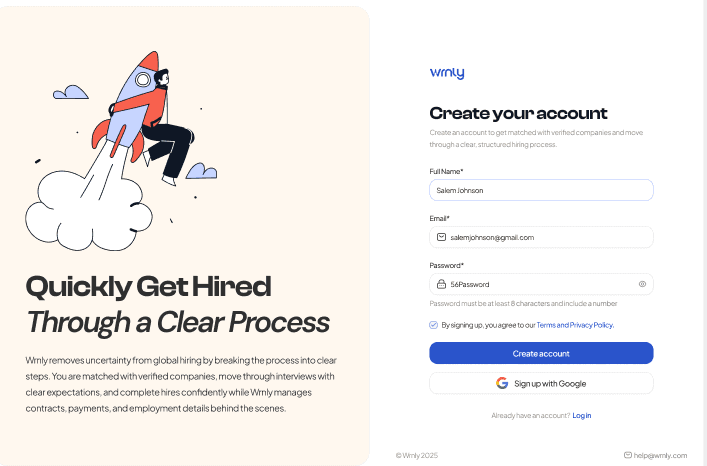
Step 1: I created a Talent Onboarding where:

Talent creates an account on Wrnly.

Step 2: The screen was to create a Wrnly Vetting Process which means:

Talent completes the internal skills assessment and profile setup.
Phase 1: Entry & Qualification (Pre-72 Hours)
Step 1: I created a Talent Onboarding where:

  • Talent creates an account on Wrnly.

Step 2: The screen was to create a Wrnly Vetting Process which means:

  • Talent completes the internal skills assessment and profile setup.

Phase 2: Role Defining (The Core MVP Flow)

Step 3: In this section, my goal was to create an experience that'll highlight the Role Matching criteria:

Where the system matches the talent with open company roles based on strict criteria.
A "Match Invite" card appears on the Talent Dashboard (tagged as Strong Fit, Low Fit, etc.).

Step 4: I then evaluated Roles that candidate is fit for based on their skills & experience.This involved:

Talent clicking into "Review Role Fit."

Talent reviewing the Company Overview, Key Expectations, 90-Day Roadmap, and Compensation.

Phase 2: Role Defining (The Core MVP Flow)

Step 3: In this section, my goal was to create an experience that'll highlight the Role Matching criteria:

  • Where the system matches the talent with open company roles based on strict criteria.

  • A "Match Invite" card appears on the Talent Dashboard (tagged as Strong Fit, Low Fit, etc.).

Step 4: I then evaluated Roles that candidate is fit for based on their skills & experience.This involved:

  • Talent clicking into "Review Role Fit."

  • Talent reviewing the Company Overview, Key Expectations, 90-Day Roadmap, and Compensation.

Phase 2: Role Defining (The Core MVP Flow)

Step 3: In this section, my goal was to create an experience that'll highlight the Role Matching criteria:
Where the system matches the talent with open company roles based on strict criteria.
A "Match Invite" card appears on the Talent Dashboard (tagged as Strong Fit, Low Fit, etc.).

Step 4: I then evaluated Roles that candidate is fit for based on their skills & experience.This involved:

Talent clicking into "Review Role Fit."

Talent reviewing the Company Overview, Key Expectations, 90-Day Roadmap, and Compensation.

Phase 3: Interview time!

Step 5: I then created an interview scheduling screen where:

Talent lands on the "Interview Schedule" screen.

Talent selects a pre-approved time slot (e.g., Feb 3, 2026, 11:00 AM PT).

Talent clicks "Accept Interview."

Step 6: Yay! - The fun part- to create an Interview Confirmation & Preparation screen where:

System generates the "Interview Confirmed" screen.

Talent receives meeting link, the interviewer's details, an agenda, and customized preparation tips.

Phase 3: Interview time!

Step 5: I then created an interview scheduling screen where:

  • Talent lands on the "Interview Schedule" screen.

  • Talent selects a pre-approved time slot (e.g., Feb 3, 2026, 11:00 AM PT).

Talent clicks "Accept Interview."

Step 6: Yay! - The fun part- to create an Interview Confirmation & Preparation screen where:

  • System generates the "Interview Confirmed" screen.

  • Talent receives meeting link, the interviewer's details, an agenda, and customized preparation tips.

Phase 3: Interview time!

Step 5: I then created an interview scheduling screen where:

Talent lands on the "Interview Schedule" screen.

Talent selects a pre-approved time slot (e.g., Feb 3, 2026, 11:00 AM PT).

Talent clicks "Accept Interview."

Step 6: Yay! - The fun part- to create an Interview Confirmation & Preparation screen where:

System generates the "Interview Confirmed" screen.

Talent receives meeting link, the interviewer's details, an agenda, and customized preparation tips.

Phase 4: Offer & Contracting

Final Step where Company says "YES."
I created an employment agreement screen that appears in the "Contract Details" tab, where Talent reviews Key Legal Highlights, compensation, and start date. For any:

Request Changes: I showcased a visual indicator that would flag the client/account manager for rapid revision.

Sign and Accept: I created a full-fledge detailed contract set up describing the talent's start date, compensation, hours of working, salary, terms and conditions and last but not the least, the signing texture for the talent to lock into the contract with the client (72-Hour fulfilment)

Phase 4: Offer & Contracting

Final Step where Company says "YES."
I created an employment agreement screen that appears in the "Contract Details" tab, where Talent reviews Key Legal Highlights, compensation, and start date. For any:

Request Changes: I showcased a visual indicator that would flag the client/account manager for rapid revision.

Sign and Accept: I created a full-fledge detailed contract set up describing the talent's start date, compensation, hours of working, salary, terms and conditions and last but not the least, the signing texture for the talent to lock into the contract with the client (72-Hour fulfilment)

Phase 4: Offer & Contracting

Final Step where Company says "YES."
I created an employment agreement screen that appears in the "Contract Details" tab, where Talent reviews Key Legal Highlights, compensation, and start date. For any:

Request Changes: I showcased a visual indicator that would flag the client/account manager for rapid revision.

Sign and Accept: I created a full-fledge detailed contract set up describing the talent's start date, compensation, hours of working, salary, terms and conditions and last but not the least, the signing texture for the talent to lock into the contract with the client (72-Hour fulfilment)

How did I execute the flow!

How did I execute the flow!

STEP 1: Total Status Transparency.


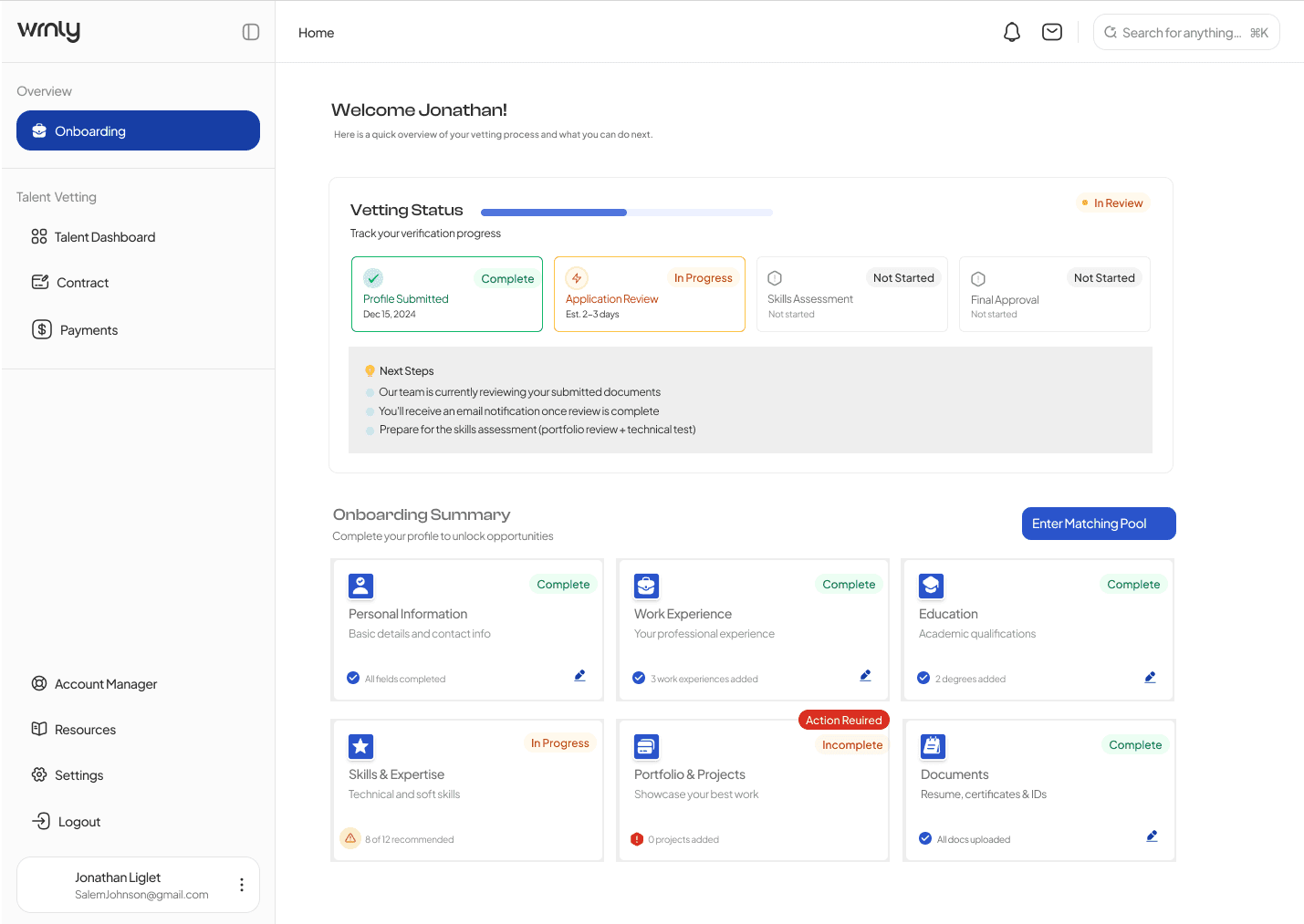
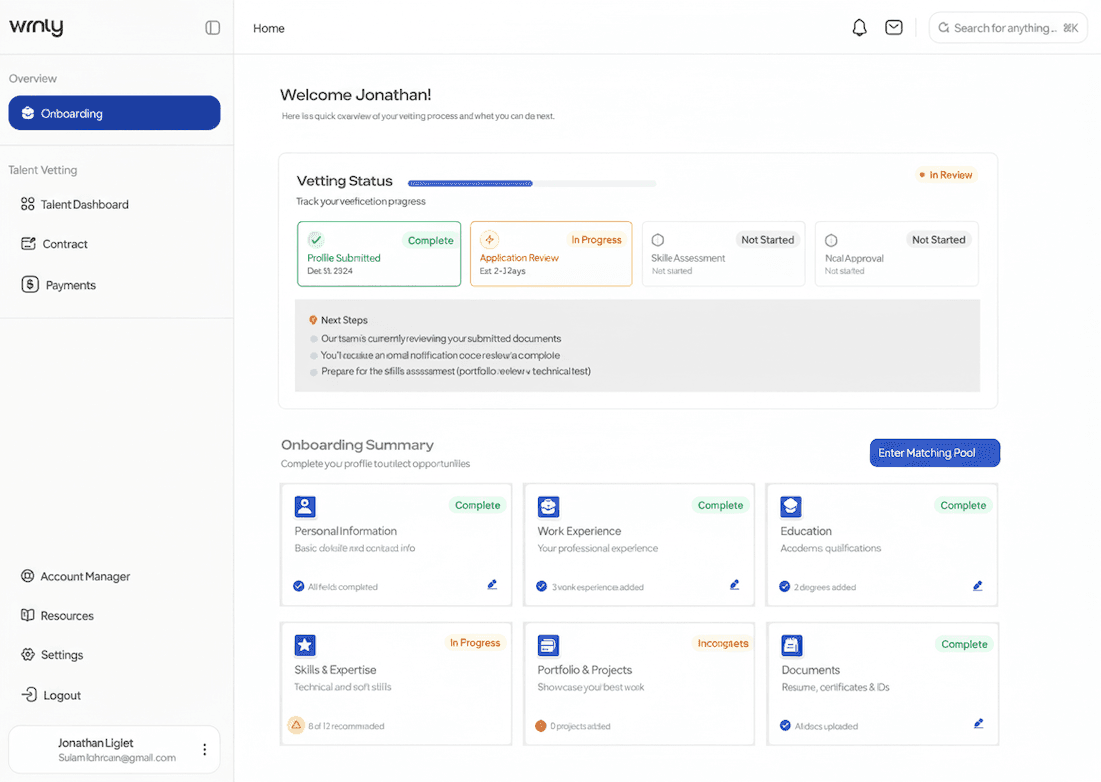
I started by tackling the onboarding flow by creating a Vetting Status Tracker.


I built a modular dashboard: Instead of one long, boring form, I broke everything into cards. I used clear "In Progress" and "Complete" tags so users could see their progress in real-time.


I designed a "Next Steps" roadmap: I added a specific section that tells the user exactly what’s happening behind the scenes (like "Our team is reviewing your documents") so they never feel ghosted.

STEP 1: Total Status Transparency.


I started by tackling the onboarding flow by creating a Vetting Status Tracker.


  • I built a modular dashboard: Instead of one long, boring form, I broke everything into cards. I used clear "In Progress" and "Complete" tags so users could see their progress in real-time.


  • I designed a "Next Steps" roadmap: I added a specific section that tells the user exactly what’s happening behind the scenes (like "Our team is reviewing your documents") so they never feel ghosted.

STEP 1: Total Status Transparency.


I started by tackling the onboarding flow by creating a Vetting Status Tracker.


I built a modular dashboard: Instead of one long, boring form, I broke everything into cards. I used clear "In Progress" and "Complete" tags so users could see their progress in real-time.


I designed a "Next Steps" roadmap: I added a specific section that tells the user exactly what’s happening behind the scenes (like "Our team is reviewing your documents") so they never feel ghosted.

STEP 2: Killing the Bad Matches Early


I realized that just showing a job description wasn't enough. I wanted to empower the talent to say "No" to the wrong roles quickly.

I designed the "Role Fit" Score: I created a visual data breakdown that compares a user’s skills directly against the role. If you’re a 9/10 match for Prototyping, I want you to see that immediately.

  • I put the "Scary" stuff upfront: I moved the salary range, time zone requirements, and "Nice-to-Have" skills to the top of the page. No more hidden deal-breakers.

  • I added a "First 90 Days" preview: I designed a roadmap section for each job so candidates can see the actual projects they’ll be leading before they even agree to an interview.

STEP 2: Killing the Bad Matches Early


I realized that just showing a job description wasn't enough. I wanted to empower the talent to say "No" to the wrong roles quickly.

I designed the "Role Fit" Score: I created a visual data breakdown that compares a user’s skills directly against the role. If you’re a 9/10 match for Prototyping, I want you to see that immediately.

  • I put the "Scary" stuff upfront: I moved the salary range, time zone requirements, and "Nice-to-Have" skills to the top of the page. No more hidden deal-breakers.

  • I added a "First 90 Days" preview: I designed a roadmap section for each job so candidates can see the actual projects they’ll be leading before they even agree to an interview.

STEP 2: Killing the Bad Matches Early


I realized that just showing a job description wasn't enough. I wanted to empower the talent to say "No" to the wrong roles quickly.

I designed the "Role Fit" Score: I created a visual data breakdown that compares a user’s skills directly against the role. If you’re a 9/10 match for Prototyping, I want you to see that immediately.

  • I put the "Scary" stuff upfront: I moved the salary range, time zone requirements, and "Nice-to-Have" skills to the top of the page. No more hidden deal-breakers.

  • I added a "First 90 Days" preview: I designed a roadmap section for each job so candidates can see the actual projects they’ll be leading before they even agree to an interview.

STEP 3: The Seamless Finish Line


The last thing I wanted was to fulfil the application process for the talent and successful onboarding.

I built an Integrated Interview Hub: I moved the scheduling away from email and directly into the app. I designed a "Confirmed" screen that gives the candidate everything they need: the meeting link, the exact agenda, and even prep tips for that specific company.

I "translated" the contract: Contracts are terrifying. I designed a summary view that highlights the big stuff—pay cycles, notice periods, and IP protection—using simple icons and plain language so people actually know what they’re signing.

STEP 3: The Seamless Finish Line


The last thing I wanted was to fulfil the application process for the talent and successful onboarding.

  • I built an Integrated Interview Hub: I moved the scheduling away from email and directly into the app. I designed a "Confirmed" screen that gives the candidate everything they need: the meeting link, the exact agenda, and even prep tips for that specific company.

  • I "translated" the contract: Contracts are terrifying. I designed a summary view that highlights the big stuff—pay cycles, notice periods, and IP protection—using simple icons and plain language so people actually know what they’re signing.

STEP 3: The Seamless Finish Line


The last thing I wanted was to fulfil the application process for the talent and successful onboarding.

I built an Integrated Interview Hub: I moved the scheduling away from email and directly into the app. I designed a "Confirmed" screen that gives the candidate everything they need: the meeting link, the exact agenda, and even prep tips for that specific company.

I "translated" the contract: Contracts are terrifying. I designed a summary view that highlights the big stuff—pay cycles, notice periods, and IP protection—using simple icons and plain language so people actually know what they’re signing.

Deep Dive

Deep Dive

I designed the talent-facing MVP to feel less like a job board and more like a personalized career management hub. The UI prioritizes clarity, actionable next steps, and transparency.

I designed the talent-facing MVP to feel less like a job board and more like a personalized career management hub. The UI prioritizes clarity, actionable next steps, and transparency.

This affinity map allowed me to fully grasp what talents' experience is like on a job-hunt mission. I gained some valuable insights into their frustrations, which brought me to arriving at these conclusions:

  • Talents need a curated list of high-match roles tailored to their skills, eliminating the fatigue of browsing through hundreds of irrelevant listings.

  • Talents require proactive updates and real-time visibility into their application status to eliminate process ambiguity.

  • The need to minimise the administrative friction and wait times for post-interview feedback to accelerate the hiring cycle.

This affinity map allowed me to fully grasp what talents' experience is like on a job-hunt mission. I gained some valuable insights into their frustrations, which brought me to arriving at these conclusions:

  • Talents need a curated list of high-match roles tailored to their skills, eliminating the fatigue of browsing through hundreds of irrelevant listings.

  • Talents require proactive updates and real-time visibility into their application status to eliminate process ambiguity.

  • The need to minimise the administrative friction and wait times for post-interview feedback to accelerate the hiring cycle.

This affinity map allowed me to fully grasp what talents' experience is like on a job-hunt mission. I gained some valuable insights into their frustrations, which brought me to arriving at these conclusions:

  • Talents need a curated list of high-match roles tailored to their skills, eliminating the fatigue of browsing through hundreds of irrelevant listings.

  • Talents require proactive updates and real-time visibility into their application status to eliminate process ambiguity.

  • The need to minimise the administrative friction and wait times for post-interview feedback to accelerate the hiring cycle.


The next step was to create a step-by-step user flow journey describing the transition from a passive candidate to an active hire through a series of high-velocity touchpoints.


This journey maps the psychological and functional shift a talent goes through: from the initial "Hook" of a matching notification to the "Action" of a one-click interview, and finally the "Investment" of signing a contract—all streamlined to fit within the 72-hour window.


The next step was to create a step-by-step user flow journey describing the transition from a passive candidate to an active hire through a series of high-velocity touchpoints.


This journey maps the psychological and functional shift a talent goes through: from the initial "Hook" of a matching notification to the "Action" of a one-click interview, and finally the "Investment" of signing a contract—all streamlined to fit within the 72-hour window.

Expected Impact

We expect users to have a streamlined experience making more informed career decisions without the usual hiring headaches.


We expect users to have a streamlined experience making more informed career decisions without the usual hiring headaches.


50% decrease in manual back-and-forth: By building the interview hub and contract summaries directly into the platform, I’ve eliminated the need for dozens of 1-on-1 emails and coordination calls.


5% growth in successful matches within the first 6 months: Because I put the "Role Fit" and salary data upfront, we’re ensuring that only high-quality, aligned matches move into the interview stage.


40% increase in user satisfaction: I’ve replaced the "black hole" anxiety with a clear, visual roadmap. Candidates will finally feel like they are in control of their own hiring journey.

50% decrease in manual back-and-forth: By building the interview hub and contract summaries directly into the platform, I’ve eliminated the need for dozens of 1-on-1 emails and coordination calls.


5% growth in successful matches within the first 6 months: Because I put the "Role Fit" and salary data upfront, we’re ensuring that only high-quality, aligned matches move into the interview stage.


40% increase in user satisfaction: I’ve replaced the "black hole" anxiety with a clear, visual roadmap. Candidates will finally feel like they are in control of their own hiring journey.

50% decrease in manual back-and-forth: By building the interview hub and contract summaries directly into the platform, I’ve eliminated the need for dozens of 1-on-1 emails and coordination calls.


5% growth in successful matches within the first 6 months: Because I put the "Role Fit" and salary data upfront, we’re ensuring that only high-quality, aligned matches move into the interview stage.


40% increase in user satisfaction: I’ve replaced the "black hole" anxiety with a clear, visual roadmap. Candidates will finally feel like they are in control of their own hiring journey.

Talent Vetting Dashboard

Talent Vetting Dashboard

From Match to Hire in 72 Hours

Who is Wrnly?

Wrnly is a talent-matching and vetting platform designed to disrupt the agonizingly slow traditional hiring process. By exclusively offering pre-vetted talent and highly targeted role matching, Wrnly connects companies with the right candidates, schedules interviews, and finalizes offers—all within 72 hours.

Wrnly is a talent-matching and vetting platform designed to disrupt the agonizingly slow traditional hiring process. By exclusively offering pre-vetted talent and highly targeted role matching, Wrnly connects companies with the right candidates, schedules interviews, and finalizes offers—all within 72 hours.

Wrnly is a talent-matching and vetting platform designed to disrupt the agonizingly slow traditional hiring process. By exclusively offering pre-vetted talent and highly targeted role matching, Wrnly connects companies with the right candidates, schedules interviews, and finalizes offers—all within 72 hours.

Expected to streamline the hiring process and increase the successful match rate by 5% within the first 6 months.

Expected to streamline the hiring process and increase the successful match rate by

5% within the first 6 months.

The Problem…

The Problem…

When I looked at how global hiring usually works, I saw three massive gaps :

When I looked at how global hiring usually works, I saw three massive gaps :

The "Black Hole" Problem

Talent apply and then hear nothing for weeks.They wonder, "Did my application even go through?" It’s a total anxiety-fest.

Scheduling hell

One email to suggest a time, one to say "I'm busy," one to suggest a new time, and another because someone forgot the Zoom link.

Stalled Lives

Talent go through a rigorous 3-week interview only to find out the company is non-negotiable with salary or they hired someone internally.

The "Black Hole" Problem

Talent apply and then hear nothing for weeks.They wonder, "Did my application even go through?" It’s a total anxiety-fest.

Scheduling hell

One email to suggest a time, one to say "I'm busy," one to suggest a new time, and another because someone forgot the Zoom link.

Stalled Lives

Talent go through a rigorous 3-week interview only to find out the company is non-negotiable with salary or they hired someone internally.

The Solution-A Curated Talent Onboarding Flow

The Solution-A Curated Talent Onboarding Flow

Phase 1: Entry & Qualification (Pre-72 Hours)

Step 1: I created a Talent Onboarding where:

Talent creates an account on Wrnly.

Step 2: The screen was to create a Wrnly Vetting Process which means:

Talent completes the internal skills assessment and profile setup.
Phase 1: Entry & Qualification (Pre-72 Hours)
Step 1: I created a Talent Onboarding where:

  • Talent creates an account on Wrnly.

Step 2: The screen was to create a Wrnly Vetting Process which means:

  • Talent completes the internal skills assessment and profile setup.

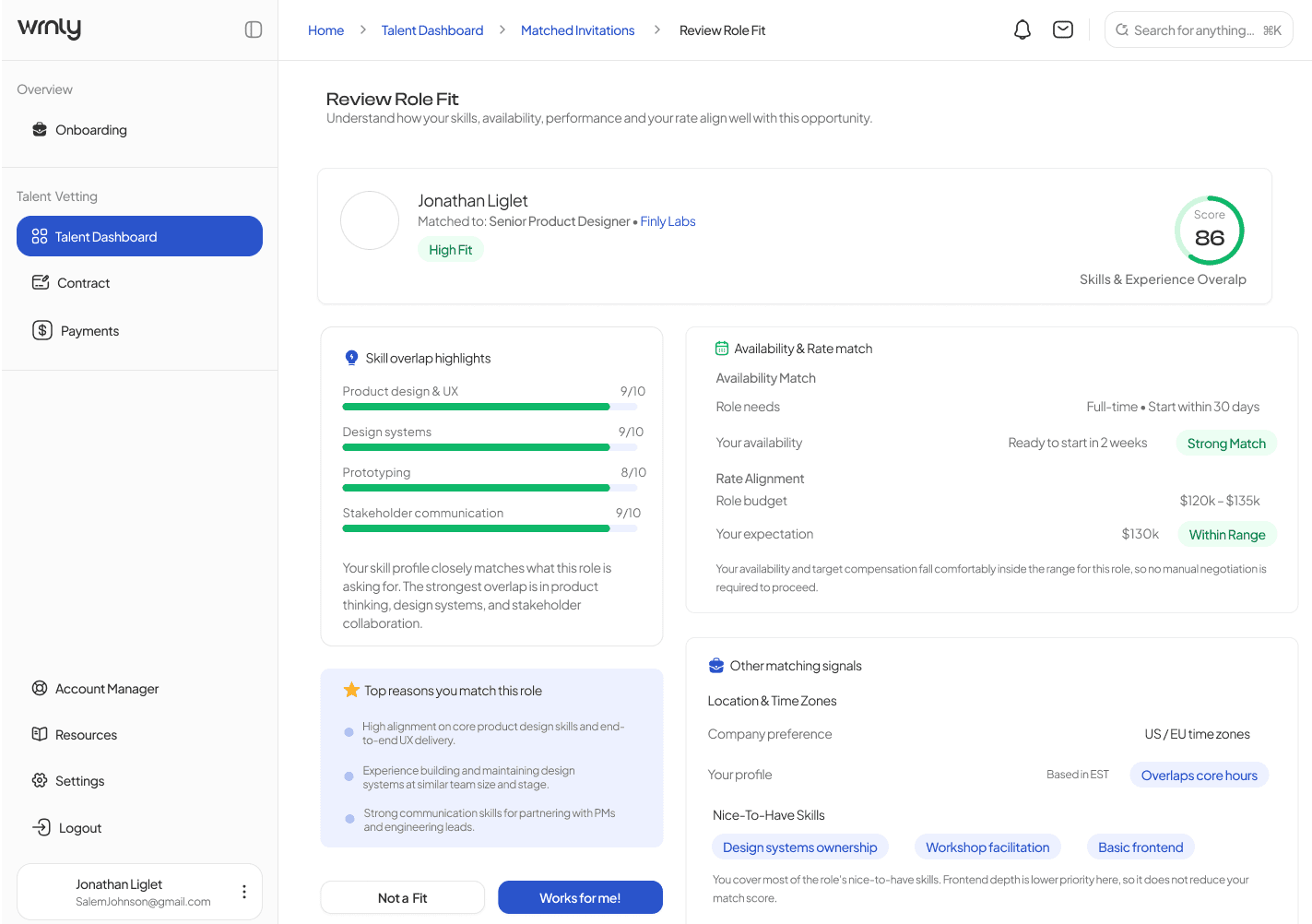
Phase 2: Role Defining (The Core MVP Flow)

Step 3: In this section, my goal was to create an experience that'll highlight the Role Matching criteria:

Where the system matches the talent with open company roles based on strict criteria.
A "Match Invite" card appears on the Talent Dashboard (tagged as Strong Fit, Low Fit, etc.).

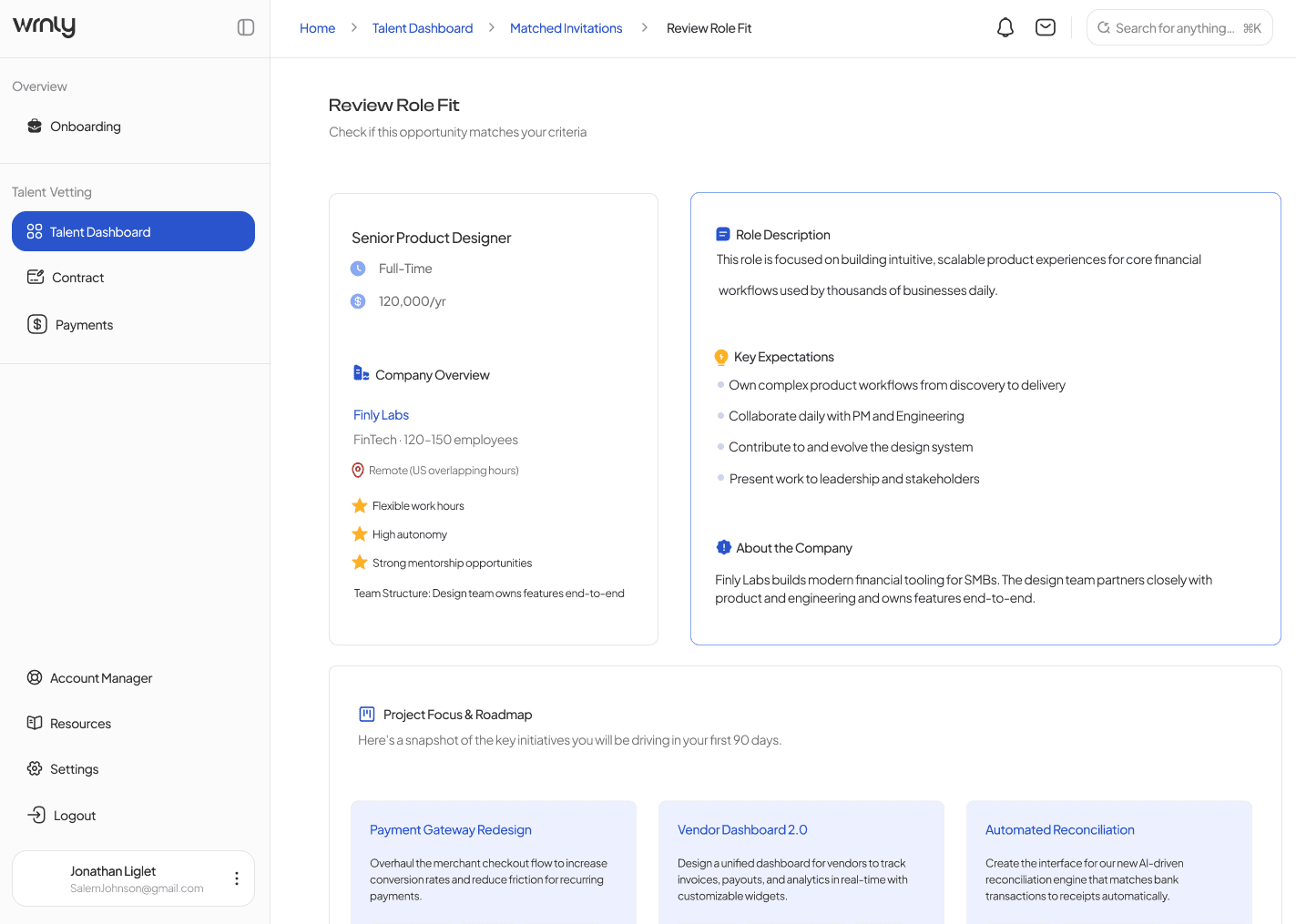
Step 4: I then evaluated Roles that candidate is fit for based on their skills & experience.This involved:

Talent clicking into "Review Role Fit."

Talent reviewing the Company Overview, Key Expectations, 90-Day Roadmap, and Compensation.
Phase 2: Role Defining (The Core MVP Flow)

Step 3: In this section, my goal was to create an experience that'll highlight the Role Matching criteria:

  • Where the system matches the talent with open company roles based on strict criteria.

  • A "Match Invite" card appears on the Talent Dashboard (tagged as Strong Fit, Low Fit, etc.).

Step 4: I then evaluated Roles that candidate is fit for based on their skills & experience.This involved:

  • Talent clicking into "Review Role Fit."

  • Talent reviewing the Company Overview, Key Expectations, 90-Day Roadmap, and Compensation.

Phase 2: Role Defining (The Core MVP Flow)

Step 3: In this section, my goal was to create an experience that'll highlight the Role Matching criteria:
Where the system matches the talent with open company roles based on strict criteria.
A "Match Invite" card appears on the Talent Dashboard (tagged as Strong Fit, Low Fit, etc.).

Step 4: I then evaluated Roles that candidate is fit for based on their skills & experience.This involved:

Talent clicking into "Review Role Fit."

Talent reviewing the Company Overview, Key Expectations, 90-Day Roadmap, and Compensation.
Phase 3: Interview time!

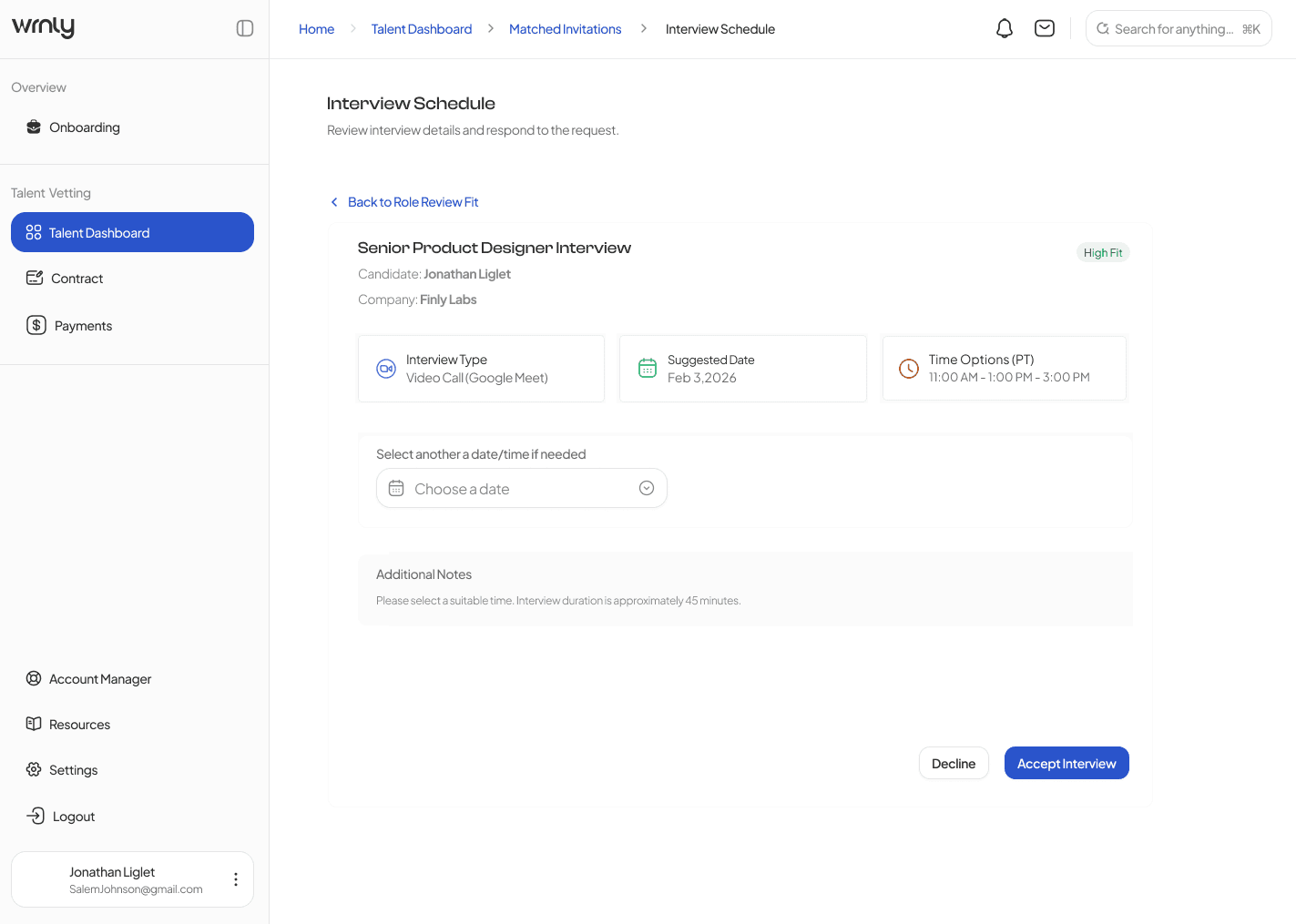
Step 5: I then created an interview scheduling screen where:

Talent lands on the "Interview Schedule" screen.

Talent selects a pre-approved time slot (e.g., Feb 3, 2026, 11:00 AM PT).

Talent clicks "Accept Interview."

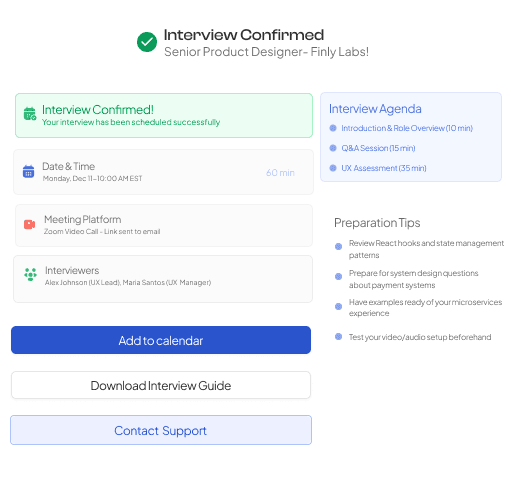
Step 6: Yay! - The fun part- to create an Interview Confirmation & Preparation screen where:

System generates the "Interview Confirmed" screen.

Talent receives meeting link, the interviewer's details, an agenda, and customized preparation tips.
Phase 3: Interview time!

Step 5: I then created an interview scheduling screen where:

  • Talent lands on the "Interview Schedule" screen.

  • Talent selects a pre-approved time slot (e.g., Feb 3, 2026, 11:00 AM PT).

Talent clicks "Accept Interview."

Step 6: Yay! - The fun part- to create an Interview Confirmation & Preparation screen where:

  • System generates the "Interview Confirmed" screen.

  • Talent receives meeting link, the interviewer's details, an agenda, and customized preparation tips.

Phase 3: Interview time!

Step 5: I then created an interview scheduling screen where:

Talent lands on the "Interview Schedule" screen.

Talent selects a pre-approved time slot (e.g., Feb 3, 2026, 11:00 AM PT).

Talent clicks "Accept Interview."

Step 6: Yay! - The fun part- to create an Interview Confirmation & Preparation screen where:

System generates the "Interview Confirmed" screen.

Talent receives meeting link, the interviewer's details, an agenda, and customized preparation tips.

Phase 4: Offer & Contracting

Final Step where Company says "YES."
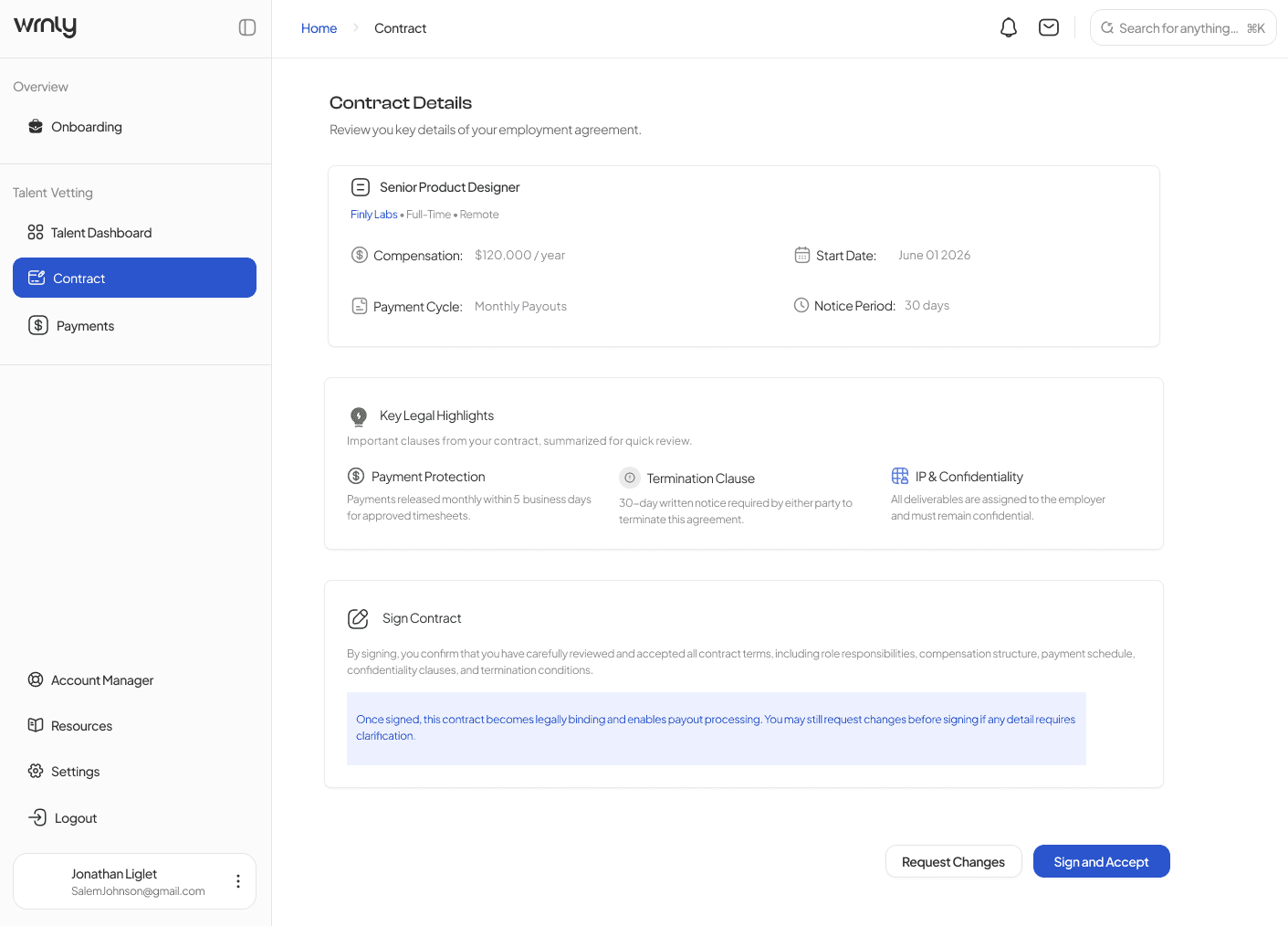
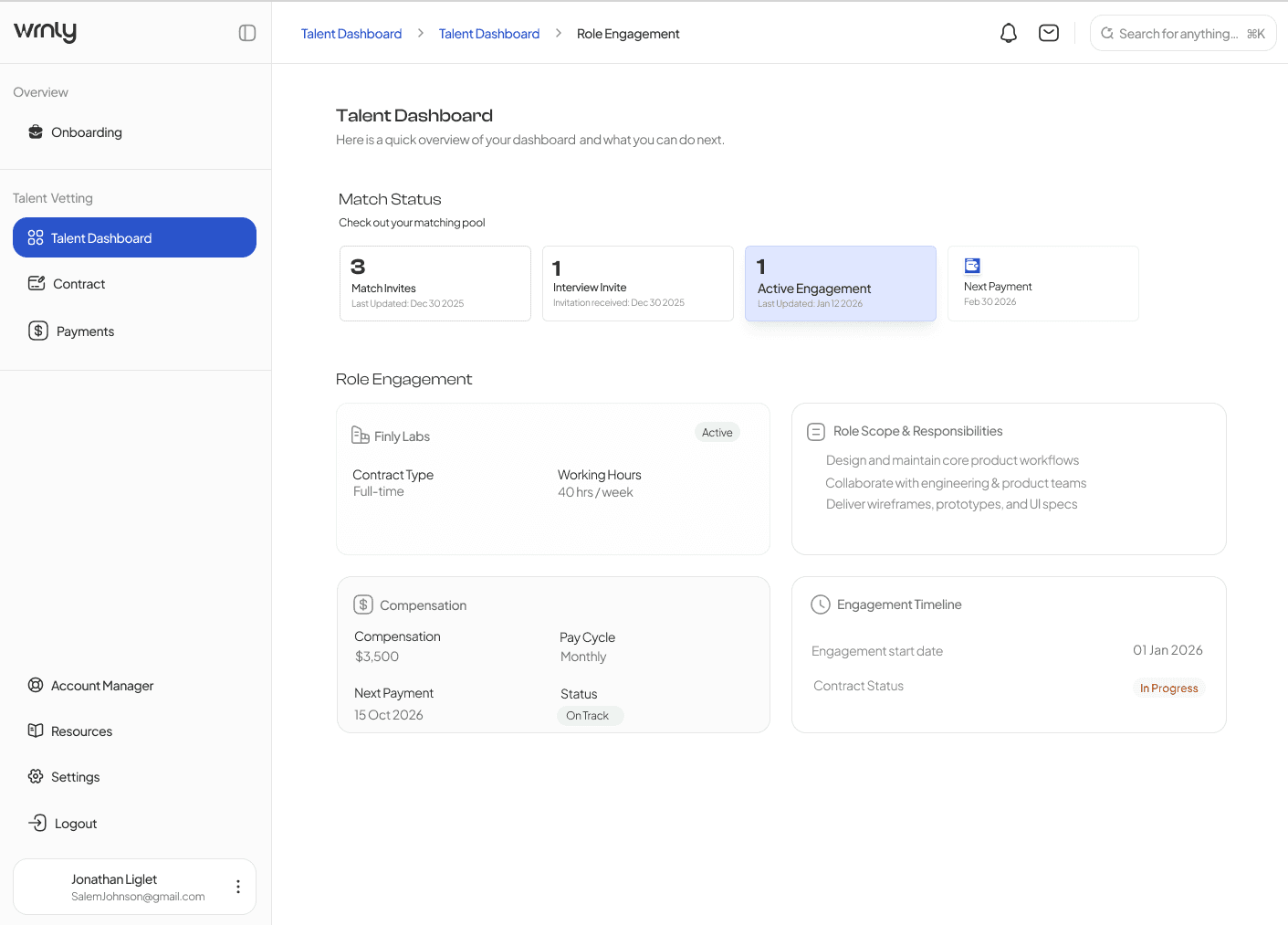
I created an employment agreement screen that appears in the "Contract Details" tab, where Talent reviews Key Legal Highlights, compensation, and start date. For any:

Request Changes: I showcased a visual indicator that would flag the client/account manager for rapid revision.

Sign and Accept: I created a full-fledge detailed contract set up describing the talent's start date, compensation, hours of working, salary, terms and conditions and last but not the least, the signing texture for the talent to lock into the contract with the client (72-Hour fulfilment)
Phase 4: Offer & Contracting

Final Step where Company says "YES."
I created an employment agreement screen that appears in the "Contract Details" tab, where Talent reviews Key Legal Highlights, compensation, and start date. For any:

Request Changes: I showcased a visual indicator that would flag the client/account manager for rapid revision.

Sign and Accept: I created a full-fledge detailed contract set up describing the talent's start date, compensation, hours of working, salary, terms and conditions and last but not the least, the signing texture for the talent to lock into the contract with the client (72-Hour fulfilment)

Phase 4: Offer & Contracting

Final Step where Company says "YES."
I created an employment agreement screen that appears in the "Contract Details" tab, where Talent reviews Key Legal Highlights, compensation, and start date. For any:

Request Changes: I showcased a visual indicator that would flag the client/account manager for rapid revision.

Sign and Accept: I created a full-fledge detailed contract set up describing the talent's start date, compensation, hours of working, salary, terms and conditions and last but not the least, the signing texture for the talent to lock into the contract with the client (72-Hour fulfilment)

How did I execute the flow!

How did I execute the flow!

STEP 1: Total Status Transparency.


I started by tackling the onboarding flow by creating a Vetting Status Tracker.


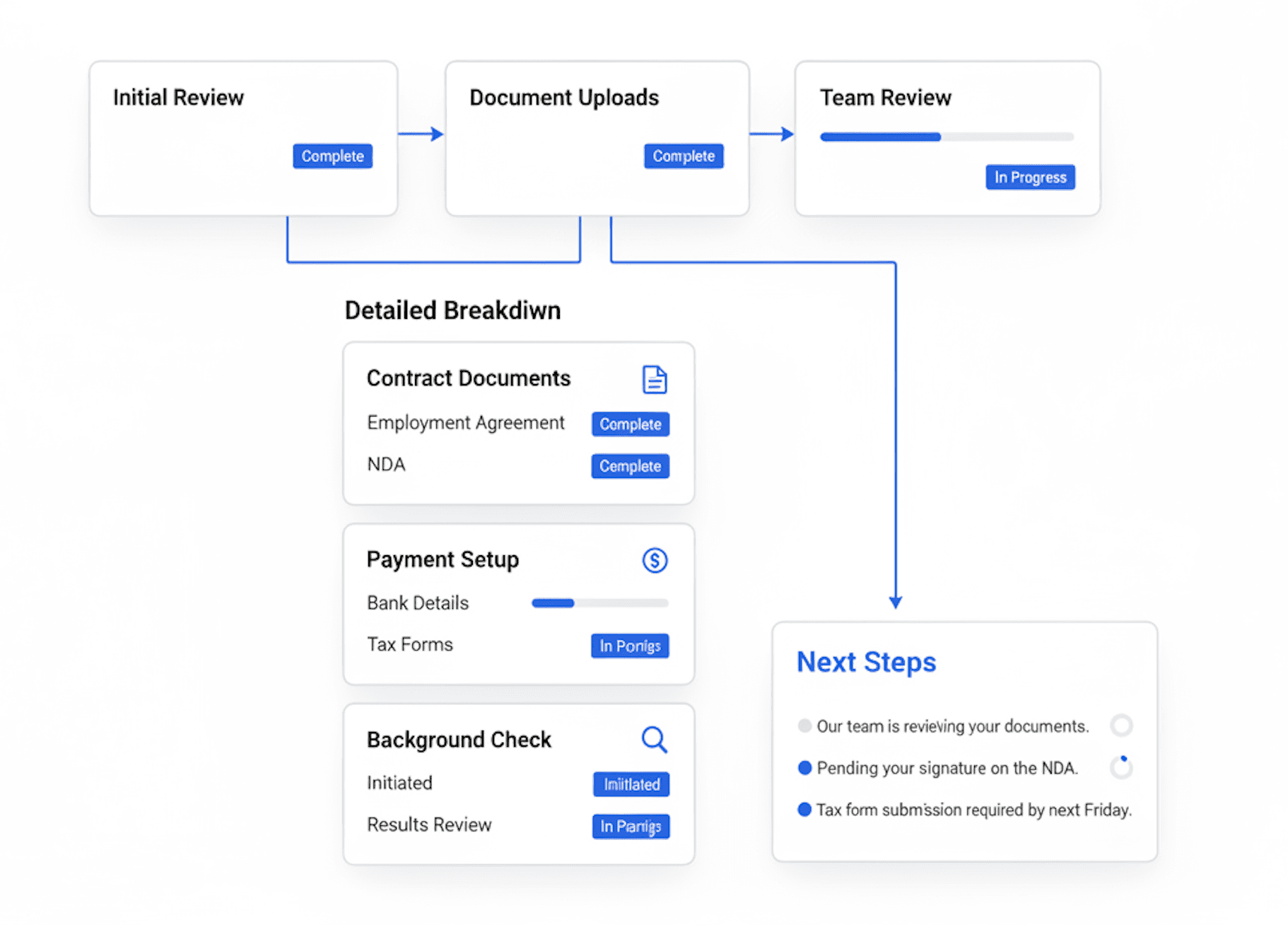
I built a modular dashboard: Instead of one long, boring form, I broke everything into cards. I used clear "In Progress" and "Complete" tags so users could see their progress in real-time.


I designed a "Next Steps" roadmap: I added a specific section that tells the user exactly what’s happening behind the scenes (like "Our team is reviewing your documents") so they never feel ghosted.
STEP 1: Total Status Transparency.


I started by tackling the onboarding flow by creating a Vetting Status Tracker.


  • I built a modular dashboard: Instead of one long, boring form, I broke everything into cards. I used clear "In Progress" and "Complete" tags so users could see their progress in real-time.


  • I designed a "Next Steps" roadmap: I added a specific section that tells the user exactly what’s happening behind the scenes (like "Our team is reviewing your documents") so they never feel ghosted.

STEP 1: Total Status Transparency.


I started by tackling the onboarding flow by creating a Vetting Status Tracker.


I built a modular dashboard: Instead of one long, boring form, I broke everything into cards. I used clear "In Progress" and "Complete" tags so users could see their progress in real-time.


I designed a "Next Steps" roadmap: I added a specific section that tells the user exactly what’s happening behind the scenes (like "Our team is reviewing your documents") so they never feel ghosted.

STEP 2: Killing the Bad Matches Early


I realized that just showing a job description wasn't enough. I wanted to empower the talent to say "No" to the wrong roles quickly.

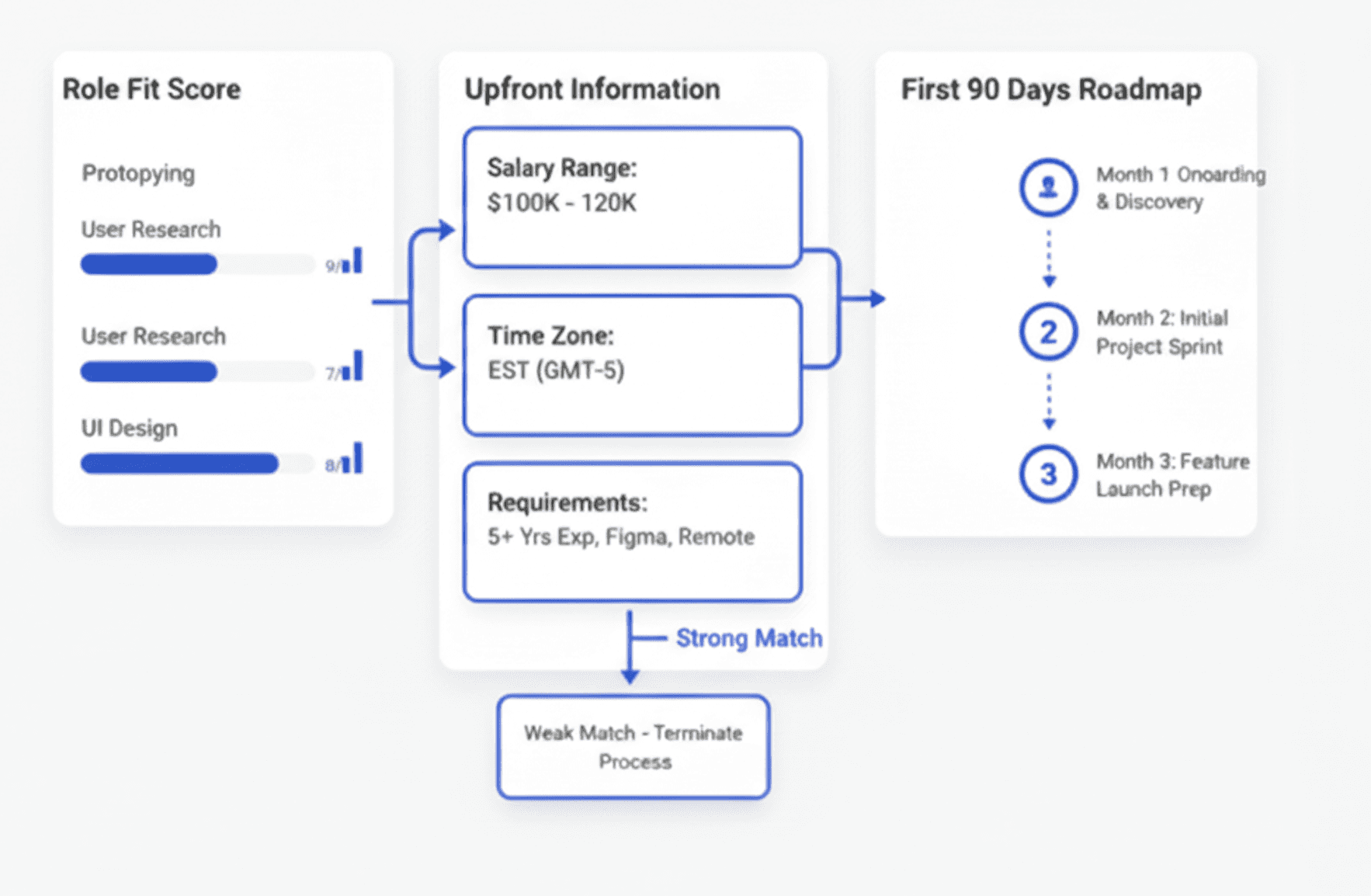
I designed the "Role Fit" Score: I created a visual data breakdown that compares a user’s skills directly against the role. If you’re a 9/10 match for Prototyping, I want you to see that immediately.

  • I put the "Scary" stuff upfront: I moved the salary range, time zone requirements, and "Nice-to-Have" skills to the top of the page. No more hidden deal-breakers.

  • I added a "First 90 Days" preview: I designed a roadmap section for each job so candidates can see the actual projects they’ll be leading before they even agree to an interview.
STEP 2: Killing the Bad Matches Early


I realized that just showing a job description wasn't enough. I wanted to empower the talent to say "No" to the wrong roles quickly.

I designed the "Role Fit" Score: I created a visual data breakdown that compares a user’s skills directly against the role. If you’re a 9/10 match for Prototyping, I want you to see that immediately.

  • I put the "Scary" stuff upfront: I moved the salary range, time zone requirements, and "Nice-to-Have" skills to the top of the page. No more hidden deal-breakers.

  • I added a "First 90 Days" preview: I designed a roadmap section for each job so candidates can see the actual projects they’ll be leading before they even agree to an interview.

STEP 2: Killing the Bad Matches Early


I realized that just showing a job description wasn't enough. I wanted to empower the talent to say "No" to the wrong roles quickly.

I designed the "Role Fit" Score: I created a visual data breakdown that compares a user’s skills directly against the role. If you’re a 9/10 match for Prototyping, I want you to see that immediately.

  • I put the "Scary" stuff upfront: I moved the salary range, time zone requirements, and "Nice-to-Have" skills to the top of the page. No more hidden deal-breakers.

  • I added a "First 90 Days" preview: I designed a roadmap section for each job so candidates can see the actual projects they’ll be leading before they even agree to an interview.

STEP 3: The Seamless Finish Line


The last thing I wanted was to fulfil the application process for the talent and successful onboarding.

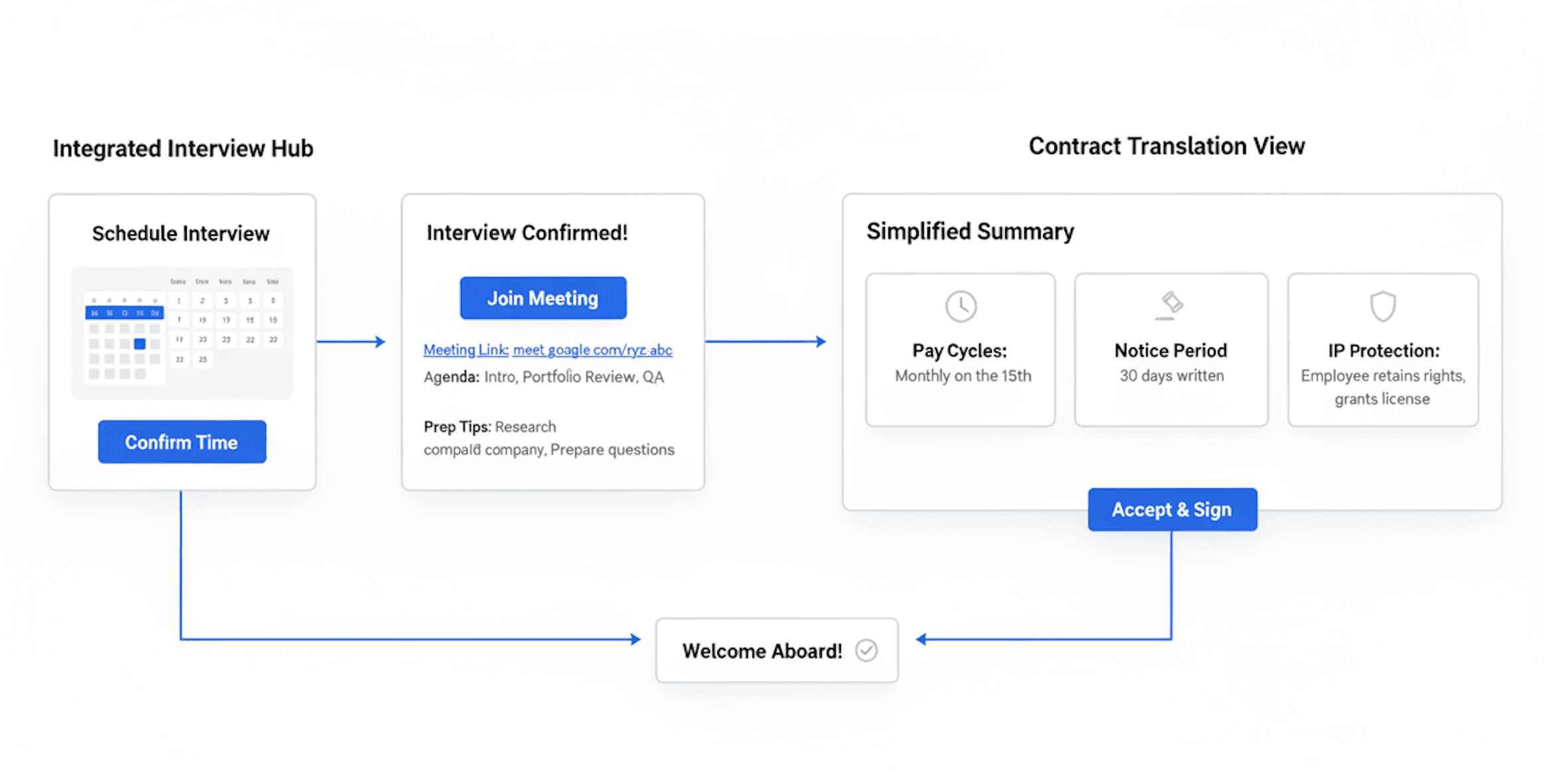
I built an Integrated Interview Hub: I moved the scheduling away from email and directly into the app. I designed a "Confirmed" screen that gives the candidate everything they need: the meeting link, the exact agenda, and even prep tips for that specific company.

I "translated" the contract: Contracts are terrifying. I designed a summary view that highlights the big stuff—pay cycles, notice periods, and IP protection—using simple icons and plain language so people actually know what they’re signing.
STEP 3: The Seamless Finish Line


The last thing I wanted was to fulfil the application process for the talent and successful onboarding.

  • I built an Integrated Interview Hub: I moved the scheduling away from email and directly into the app. I designed a "Confirmed" screen that gives the candidate everything they need: the meeting link, the exact agenda, and even prep tips for that specific company.

  • I "translated" the contract: Contracts are terrifying. I designed a summary view that highlights the big stuff—pay cycles, notice periods, and IP protection—using simple icons and plain language so people actually know what they’re signing.

STEP 3: The Seamless Finish Line


The last thing I wanted was to fulfil the application process for the talent and successful onboarding.

I built an Integrated Interview Hub: I moved the scheduling away from email and directly into the app. I designed a "Confirmed" screen that gives the candidate everything they need: the meeting link, the exact agenda, and even prep tips for that specific company.

I "translated" the contract: Contracts are terrifying. I designed a summary view that highlights the big stuff—pay cycles, notice periods, and IP protection—using simple icons and plain language so people actually know what they’re signing.

Deep Dive

Deep Dive

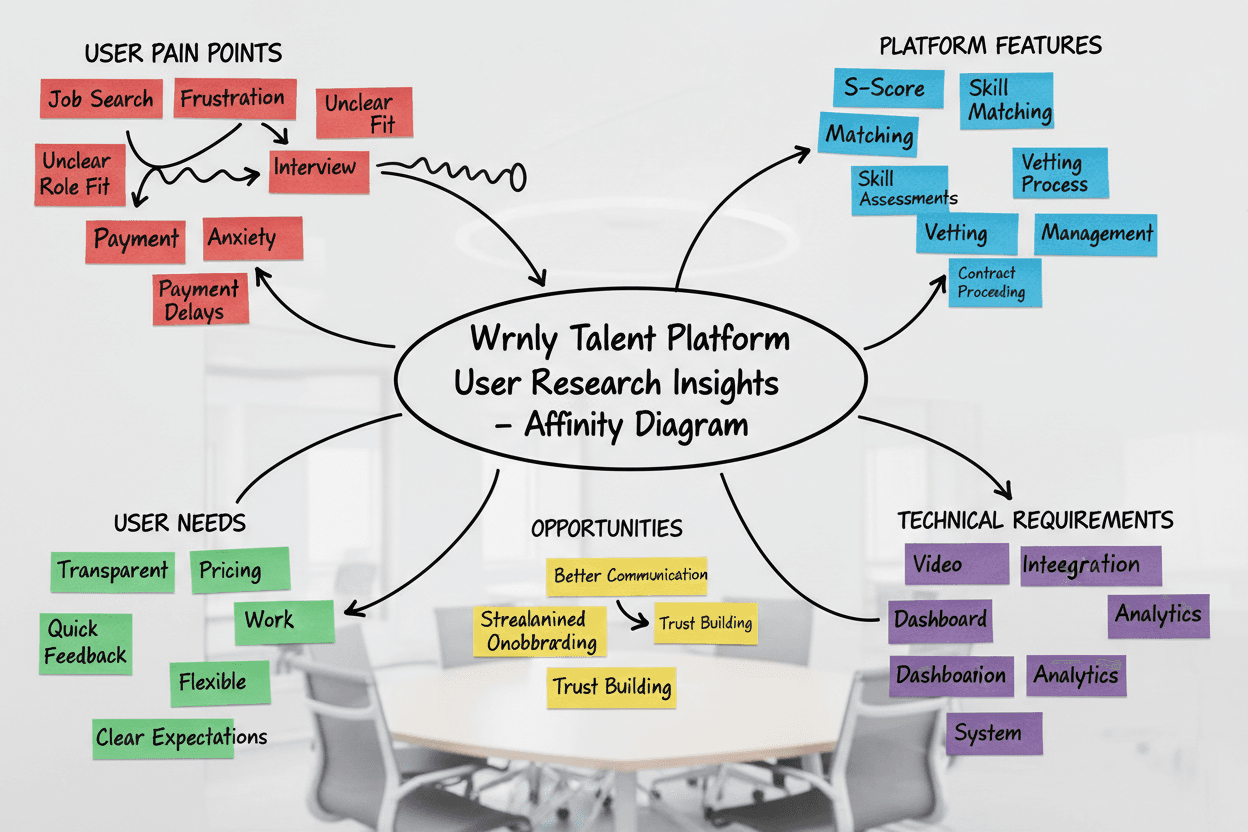
I designed the talent-facing MVP to feel less like a job board and more like a personalized career management hub. The UI prioritizes clarity, actionable next steps, and transparency.
I designed the talent-facing MVP to feel less like a job board and more like a personalized career management hub. The UI prioritizes clarity, actionable next steps, and transparency.

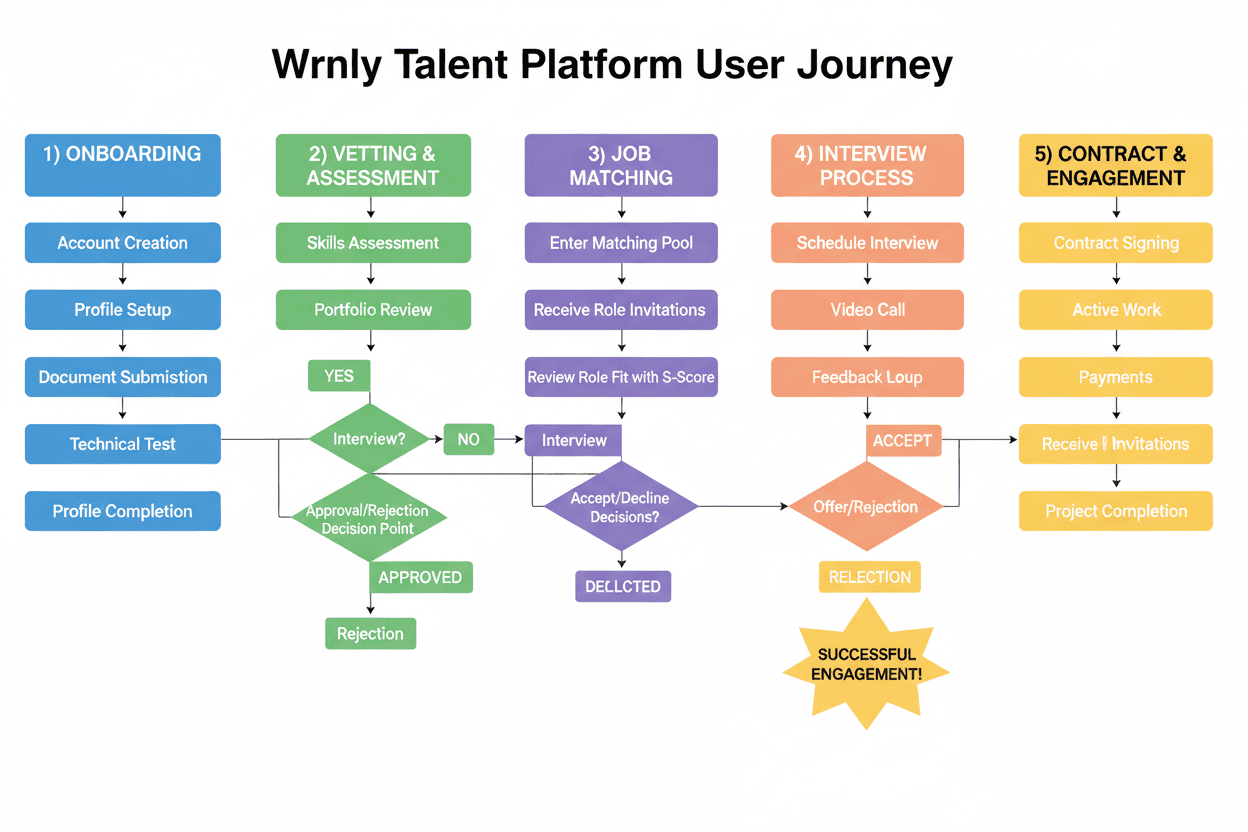
This affinity map allowed me to fully grasp what talents' experience is like on a job-hunt mission. I gained some valuable insights into their frustrations, which brought me to arriving at these conclusions:

  • Talents need a curated list of high-match roles tailored to their skills, eliminating the fatigue of browsing through hundreds of irrelevant listings.

  • Talents require proactive updates and real-time visibility into their application status to eliminate process ambiguity.

  • The need to minimise the administrative friction and wait times for post-interview feedback to accelerate the hiring cycle.
This affinity map allowed me to fully grasp what talents' experience is like on a job-hunt mission. I gained some valuable insights into their frustrations, which brought me to arriving at these conclusions:

  • Talents need a curated list of high-match roles tailored to their skills, eliminating the fatigue of browsing through hundreds of irrelevant listings.

  • Talents require proactive updates and real-time visibility into their application status to eliminate process ambiguity.

  • The need to minimise the administrative friction and wait times for post-interview feedback to accelerate the hiring cycle.

This affinity map allowed me to fully grasp what talents' experience is like on a job-hunt mission. I gained some valuable insights into their frustrations, which brought me to arriving at these conclusions:

  • Talents need a curated list of high-match roles tailored to their skills, eliminating the fatigue of browsing through hundreds of irrelevant listings.

  • Talents require proactive updates and real-time visibility into their application status to eliminate process ambiguity.

  • The need to minimise the administrative friction and wait times for post-interview feedback to accelerate the hiring cycle.


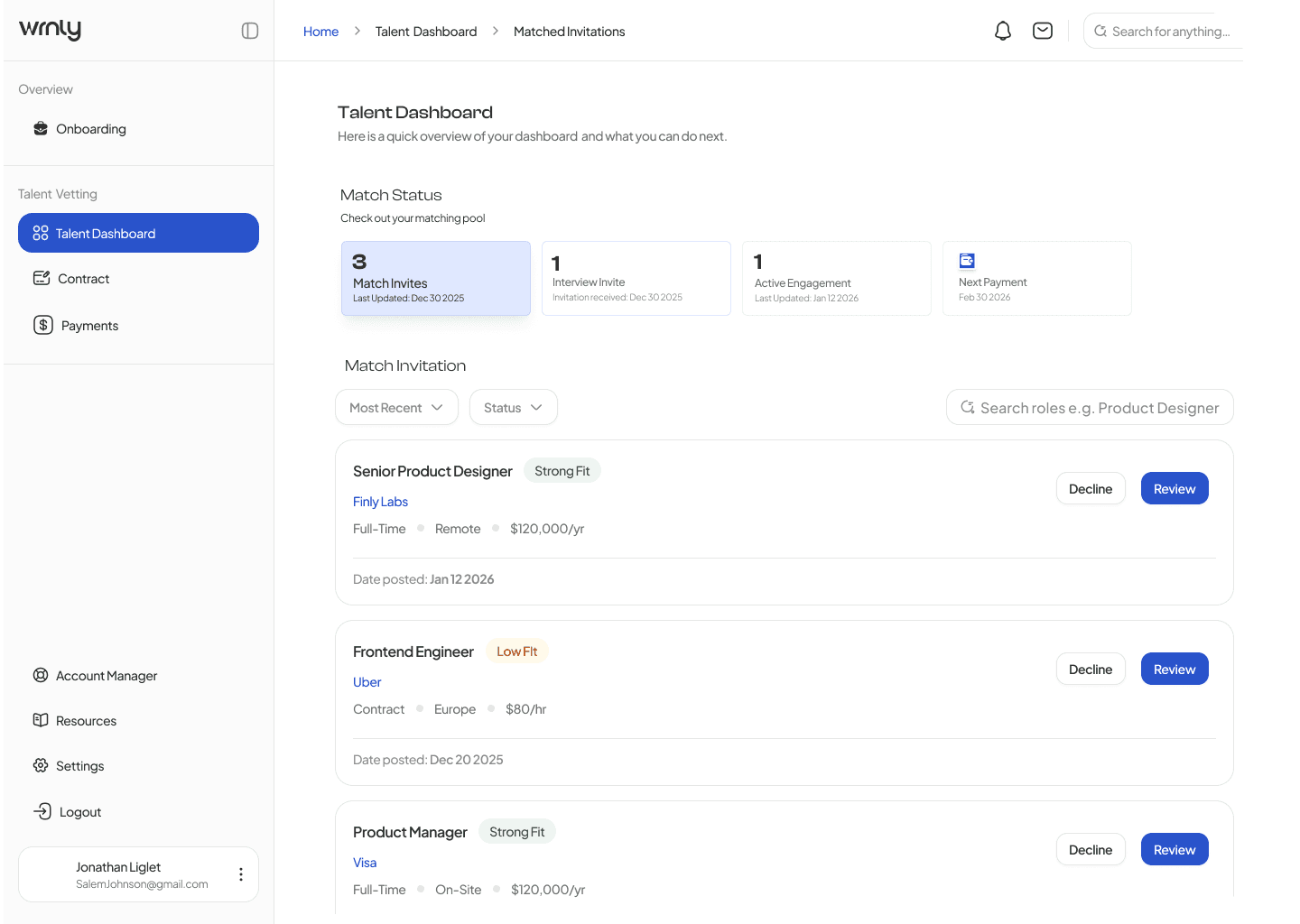
The next step was to create a step-by-step user flow journey describing the transition from a passive candidate to an active hire through a series of high-velocity touchpoints.


This journey maps the psychological and functional shift a talent goes through: from the initial "Hook" of a matching notification to the "Action" of a one-click interview, and finally the "Investment" of signing a contract—all streamlined to fit within the 72-hour window.


The next step was to create a step-by-step user flow journey describing the transition from a passive candidate to an active hire through a series of high-velocity touchpoints.


This journey maps the psychological and functional shift a talent goes through: from the initial "Hook" of a matching notification to the "Action" of a one-click interview, and finally the "Investment" of signing a contract—all streamlined to fit within the 72-hour window.

Expected Impact

We expect users to have a streamlined experience making more informed career decisions without the usual hiring headaches.

We expect users to have a streamlined experience making more informed career decisions without the usual hiring headaches.


50% decrease in manual back-and-forth: By building the interview hub and contract summaries directly into the platform, I’ve eliminated the need for dozens of 1-on-1 emails and coordination calls.


5% growth in successful matches within the first 6 months: Because I put the "Role Fit" and salary data upfront, we’re ensuring that only high-quality, aligned matches move into the interview stage.


40% increase in user satisfaction: I’ve replaced the "black hole" anxiety with a clear, visual roadmap. Candidates will finally feel like they are in control of their own hiring journey.

50% decrease in manual back-and-forth: By building the interview hub and contract summaries directly into the platform, I’ve eliminated the need for dozens of 1-on-1 emails and coordination calls.


5% growth in successful matches within the first 6 months: Because I put the "Role Fit" and salary data upfront, we’re ensuring that only high-quality, aligned matches move into the interview stage.


40% increase in user satisfaction: I’ve replaced the "black hole" anxiety with a clear, visual roadmap. Candidates will finally feel like they are in control of their own hiring journey.

50% decrease in manual back-and-forth: By building the interview hub and contract summaries directly into the platform, I’ve eliminated the need for dozens of 1-on-1 emails and coordination calls.


5% growth in successful matches within the first 6 months: Because I put the "Role Fit" and salary data upfront, we’re ensuring that only high-quality, aligned matches move into the interview stage.


40% increase in user satisfaction: I’ve replaced the "black hole" anxiety with a clear, visual roadmap. Candidates will finally feel like they are in control of their own hiring journey.

Talent Vetting Dashboard

Talent Vetting Dashboard

From Match to Hire in 72 Hours

Who is Wrnly?

Wrnly is a talent-matching and vetting platform designed to disrupt the agonizingly slow traditional hiring process. By exclusively offering pre-vetted talent and highly targeted role matching, Wrnly connects companies with the right candidates, schedules interviews, and finalizes offers—all within 72 hours.

Wrnly is a talent-matching and vetting platform designed to disrupt the agonizingly slow traditional hiring process. By exclusively offering pre-vetted talent and highly targeted role matching, Wrnly connects companies with the right candidates, schedules interviews, and finalizes offers—all within 72 hours.

Wrnly is a talent-matching and vetting platform designed to disrupt the agonizingly slow traditional hiring process. By exclusively offering pre-vetted talent and highly targeted role matching, Wrnly connects companies with the right candidates, schedules interviews, and finalizes offers—all within 72 hours.

Expected to streamline the hiring process and increase the successful match rate by 5% within the first 6 months.

Expected to streamline the hiring process and increase the successful match rate by

5% within the first 6 months.

The Problem…

The Problem…

When I looked at how global hiring usually works, I saw three massive gaps :

When I looked at how global hiring usually works, I saw three massive gaps :

The "Black Hole" Problem

Talent apply and then hear nothing for weeks.They wonder, "Did my application even go through?" It’s a total anxiety-fest.

Scheduling hell

One email to suggest a time, one to say "I'm busy," one to suggest a new time, and another because someone forgot the Zoom link.

Stalled Lives

Talent go through a rigorous 3-week interview only to find out the company is non-negotiable with salary or they hired someone internally.

The "Black Hole" Problem

Talent apply and then hear nothing for weeks.They wonder, "Did my application even go through?" It’s a total anxiety-fest.

Scheduling hell

One email to suggest a time, one to say "I'm busy," one to suggest a new time, and another because someone forgot the Zoom link.

Stalled Lives

Talent go through a rigorous 3-week interview only to find out the company is non-negotiable with salary or they hired someone internally.

The Solution-A Curated Talent Onboarding Flow

The Solution-A Curated Talent Onboarding Flow

Phase 1: Entry & Qualification (Pre-72 Hours)

Step 1: I created a Talent Onboarding where:

Talent creates an account on Wrnly.

Step 2: The screen was to create a Wrnly Vetting Process which means:

Talent completes the internal skills assessment and profile setup.

Phase 1: Entry & Qualification (Pre-72 Hours)
Step 1: I created a Talent Onboarding where:

  • Talent creates an account on Wrnly.

Step 2: The screen was to create a Wrnly Vetting Process which means:

  • Talent completes the internal skills assessment and profile setup.

Phase 2: Role Defining (The Core MVP Flow)

Step 3: In this section, my goal was to create an experience that'll highlight the Role Matching criteria:

Where the system matches the talent with open company roles based on strict criteria.
A "Match Invite" card appears on the Talent Dashboard (tagged as Strong Fit, Low Fit, etc.).

Step 4: I then evaluated Roles that candidate is fit for based on their skills & experience.This involved:

Talent clicking into "Review Role Fit."

Talent reviewing the Company Overview, Key Expectations, 90-Day Roadmap, and Compensation.

Phase 2: Role Defining (The Core MVP Flow)

Step 3: In this section, my goal was to create an experience that'll highlight the Role Matching criteria:

  • Where the system matches the talent with open company roles based on strict criteria.

  • A "Match Invite" card appears on the Talent Dashboard (tagged as Strong Fit, Low Fit, etc.).

Step 4: I then evaluated Roles that candidate is fit for based on their skills & experience.This involved:

  • Talent clicking into "Review Role Fit."

  • Talent reviewing the Company Overview, Key Expectations, 90-Day Roadmap, and Compensation.

Phase 2: Role Defining (The Core MVP Flow)

Step 3: In this section, my goal was to create an experience that'll highlight the Role Matching criteria:
Where the system matches the talent with open company roles based on strict criteria.
A "Match Invite" card appears on the Talent Dashboard (tagged as Strong Fit, Low Fit, etc.).

Step 4: I then evaluated Roles that candidate is fit for based on their skills & experience.This involved:

Talent clicking into "Review Role Fit."

Talent reviewing the Company Overview, Key Expectations, 90-Day Roadmap, and Compensation.

Phase 3: Interview time!

Step 5: I then created an interview scheduling screen where:

Talent lands on the "Interview Schedule" screen.

Talent selects a pre-approved time slot (e.g., Feb 3, 2026, 11:00 AM PT).

Talent clicks "Accept Interview."

Step 6: Yay! - The fun part- to create an Interview Confirmation & Preparation screen where:

System generates the "Interview Confirmed" screen.

Talent receives meeting link, the interviewer's details, an agenda, and customized preparation tips.

Phase 3: Interview time!

Step 5: I then created an interview scheduling screen where:

  • Talent lands on the "Interview Schedule" screen.

  • Talent selects a pre-approved time slot (e.g., Feb 3, 2026, 11:00 AM PT).

Talent clicks "Accept Interview."

Step 6: Yay! - The fun part- to create an Interview Confirmation & Preparation screen where:

  • System generates the "Interview Confirmed" screen.

  • Talent receives meeting link, the interviewer's details, an agenda, and customized preparation tips.

Phase 3: Interview time!

Step 5: I then created an interview scheduling screen where:

Talent lands on the "Interview Schedule" screen.

Talent selects a pre-approved time slot (e.g., Feb 3, 2026, 11:00 AM PT).

Talent clicks "Accept Interview."

Step 6: Yay! - The fun part- to create an Interview Confirmation & Preparation screen where:

System generates the "Interview Confirmed" screen.

Talent receives meeting link, the interviewer's details, an agenda, and customized preparation tips.

Phase 4: Offer & Contracting

Final Step where Company says "YES."
I created an employment agreement screen that appears in the "Contract Details" tab, where Talent reviews Key Legal Highlights, compensation, and start date. For any:

Request Changes: I showcased a visual indicator that would flag the client/account manager for rapid revision.

Sign and Accept: I created a full-fledge detailed contract set up describing the talent's start date, compensation, hours of working, salary, terms and conditions and last but not the least, the signing texture for the talent to lock into the contract with the client (72-Hour fulfilment)

Phase 4: Offer & Contracting

Final Step where Company says "YES."
I created an employment agreement screen that appears in the "Contract Details" tab, where Talent reviews Key Legal Highlights, compensation, and start date. For any:

Request Changes: I showcased a visual indicator that would flag the client/account manager for rapid revision.

Sign and Accept: I created a full-fledge detailed contract set up describing the talent's start date, compensation, hours of working, salary, terms and conditions and last but not the least, the signing texture for the talent to lock into the contract with the client (72-Hour fulfilment)

Phase 4: Offer & Contracting

Final Step where Company says "YES."
I created an employment agreement screen that appears in the "Contract Details" tab, where Talent reviews Key Legal Highlights, compensation, and start date. For any:

Request Changes: I showcased a visual indicator that would flag the client/account manager for rapid revision.

Sign and Accept: I created a full-fledge detailed contract set up describing the talent's start date, compensation, hours of working, salary, terms and conditions and last but not the least, the signing texture for the talent to lock into the contract with the client (72-Hour fulfilment)

How did I execute the flow!

How did I execute the flow!

STEP 1: Total Status Transparency.


I started by tackling the onboarding flow by creating a Vetting Status Tracker.


I built a modular dashboard: Instead of one long, boring form, I broke everything into cards. I used clear "In Progress" and "Complete" tags so users could see their progress in real-time.


I designed a "Next Steps" roadmap: I added a specific section that tells the user exactly what’s happening behind the scenes (like "Our team is reviewing your documents") so they never feel ghosted.

STEP 1: Total Status Transparency.


I started by tackling the onboarding flow by creating a Vetting Status Tracker.


  • I built a modular dashboard: Instead of one long, boring form, I broke everything into cards. I used clear "In Progress" and "Complete" tags so users could see their progress in real-time.


  • I designed a "Next Steps" roadmap: I added a specific section that tells the user exactly what’s happening behind the scenes (like "Our team is reviewing your documents") so they never feel ghosted.

STEP 1: Total Status Transparency.


I started by tackling the onboarding flow by creating a Vetting Status Tracker.


I built a modular dashboard: Instead of one long, boring form, I broke everything into cards. I used clear "In Progress" and "Complete" tags so users could see their progress in real-time.


I designed a "Next Steps" roadmap: I added a specific section that tells the user exactly what’s happening behind the scenes (like "Our team is reviewing your documents") so they never feel ghosted.

STEP 2: Killing the Bad Matches Early


I realized that just showing a job description wasn't enough. I wanted to empower the talent to say "No" to the wrong roles quickly.

I designed the "Role Fit" Score: I created a visual data breakdown that compares a user’s skills directly against the role. If you’re a 9/10 match for Prototyping, I want you to see that immediately.

  • I put the "Scary" stuff upfront: I moved the salary range, time zone requirements, and "Nice-to-Have" skills to the top of the page. No more hidden deal-breakers.

  • I added a "First 90 Days" preview: I designed a roadmap section for each job so candidates can see the actual projects they’ll be leading before they even agree to an interview.

STEP 2: Killing the Bad Matches Early


I realized that just showing a job description wasn't enough. I wanted to empower the talent to say "No" to the wrong roles quickly.

I designed the "Role Fit" Score: I created a visual data breakdown that compares a user’s skills directly against the role. If you’re a 9/10 match for Prototyping, I want you to see that immediately.

  • I put the "Scary" stuff upfront: I moved the salary range, time zone requirements, and "Nice-to-Have" skills to the top of the page. No more hidden deal-breakers.

  • I added a "First 90 Days" preview: I designed a roadmap section for each job so candidates can see the actual projects they’ll be leading before they even agree to an interview.

STEP 2: Killing the Bad Matches Early


I realized that just showing a job description wasn't enough. I wanted to empower the talent to say "No" to the wrong roles quickly.

I designed the "Role Fit" Score: I created a visual data breakdown that compares a user’s skills directly against the role. If you’re a 9/10 match for Prototyping, I want you to see that immediately.

  • I put the "Scary" stuff upfront: I moved the salary range, time zone requirements, and "Nice-to-Have" skills to the top of the page. No more hidden deal-breakers.

  • I added a "First 90 Days" preview: I designed a roadmap section for each job so candidates can see the actual projects they’ll be leading before they even agree to an interview.

STEP 3: The Seamless Finish Line


The last thing I wanted was to fulfil the application process for the talent and successful onboarding.

I built an Integrated Interview Hub: I moved the scheduling away from email and directly into the app. I designed a "Confirmed" screen that gives the candidate everything they need: the meeting link, the exact agenda, and even prep tips for that specific company.

I "translated" the contract: Contracts are terrifying. I designed a summary view that highlights the big stuff—pay cycles, notice periods, and IP protection—using simple icons and plain language so people actually know what they’re signing.

STEP 3: The Seamless Finish Line


The last thing I wanted was to fulfil the application process for the talent and successful onboarding.

  • I built an Integrated Interview Hub: I moved the scheduling away from email and directly into the app. I designed a "Confirmed" screen that gives the candidate everything they need: the meeting link, the exact agenda, and even prep tips for that specific company.

  • I "translated" the contract: Contracts are terrifying. I designed a summary view that highlights the big stuff—pay cycles, notice periods, and IP protection—using simple icons and plain language so people actually know what they’re signing.

STEP 3: The Seamless Finish Line


The last thing I wanted was to fulfil the application process for the talent and successful onboarding.

I built an Integrated Interview Hub: I moved the scheduling away from email and directly into the app. I designed a "Confirmed" screen that gives the candidate everything they need: the meeting link, the exact agenda, and even prep tips for that specific company.

I "translated" the contract: Contracts are terrifying. I designed a summary view that highlights the big stuff—pay cycles, notice periods, and IP protection—using simple icons and plain language so people actually know what they’re signing.

Deep Dive

Deep Dive

I designed the talent-facing MVP to feel less like a job board and more like a personalized career management hub. The UI prioritizes clarity, actionable next steps, and transparency.

I designed the talent-facing MVP to feel less like a job board and more like a personalized career management hub. The UI prioritizes clarity, actionable next steps, and transparency.

This affinity map allowed me to fully grasp what talents' experience is like on a job-hunt mission. I gained some valuable insights into their frustrations, which brought me to arriving at these conclusions:

  • Talents need a curated list of high-match roles tailored to their skills, eliminating the fatigue of browsing through hundreds of irrelevant listings.

  • Talents require proactive updates and real-time visibility into their application status to eliminate process ambiguity.

  • The need to minimise the administrative friction and wait times for post-interview feedback to accelerate the hiring cycle.

This affinity map allowed me to fully grasp what talents' experience is like on a job-hunt mission. I gained some valuable insights into their frustrations, which brought me to arriving at these conclusions:

  • Talents need a curated list of high-match roles tailored to their skills, eliminating the fatigue of browsing through hundreds of irrelevant listings.

  • Talents require proactive updates and real-time visibility into their application status to eliminate process ambiguity.

  • The need to minimise the administrative friction and wait times for post-interview feedback to accelerate the hiring cycle.

This affinity map allowed me to fully grasp what talents' experience is like on a job-hunt mission. I gained some valuable insights into their frustrations, which brought me to arriving at these conclusions:

  • Talents need a curated list of high-match roles tailored to their skills, eliminating the fatigue of browsing through hundreds of irrelevant listings.

  • Talents require proactive updates and real-time visibility into their application status to eliminate process ambiguity.

  • The need to minimise the administrative friction and wait times for post-interview feedback to accelerate the hiring cycle.


The next step was to create a step-by-step user flow journey describing the transition from a passive candidate to an active hire through a series of high-velocity touchpoints.


This journey maps the psychological and functional shift a talent goes through: from the initial "Hook" of a matching notification to the "Action" of a one-click interview, and finally the "Investment" of signing a contract—all streamlined to fit within the 72-hour window.


The next step was to create a step-by-step user flow journey describing the transition from a passive candidate to an active hire through a series of high-velocity touchpoints.


This journey maps the psychological and functional shift a talent goes through: from the initial "Hook" of a matching notification to the "Action" of a one-click interview, and finally the "Investment" of signing a contract—all streamlined to fit within the 72-hour window.

Expected Impact

We expect users to have a streamlined experience making more informed career decisions without the usual hiring headaches.


We expect users to have a streamlined experience making more informed career decisions without the usual hiring headaches.


50% decrease in manual back-and-forth: By building the interview hub and contract summaries directly into the platform, I’ve eliminated the need for dozens of 1-on-1 emails and coordination calls.


5% growth in successful matches within the first 6 months: Because I put the "Role Fit" and salary data upfront, we’re ensuring that only high-quality, aligned matches move into the interview stage.


40% increase in user satisfaction: I’ve replaced the "black hole" anxiety with a clear, visual roadmap. Candidates will finally feel like they are in control of their own hiring journey.

50% decrease in manual back-and-forth: By building the interview hub and contract summaries directly into the platform, I’ve eliminated the need for dozens of 1-on-1 emails and coordination calls.


5% growth in successful matches within the first 6 months: Because I put the "Role Fit" and salary data upfront, we’re ensuring that only high-quality, aligned matches move into the interview stage.


40% increase in user satisfaction: I’ve replaced the "black hole" anxiety with a clear, visual roadmap. Candidates will finally feel like they are in control of their own hiring journey.

50% decrease in manual back-and-forth: By building the interview hub and contract summaries directly into the platform, I’ve eliminated the need for dozens of 1-on-1 emails and coordination calls.


5% growth in successful matches within the first 6 months: Because I put the "Role Fit" and salary data upfront, we’re ensuring that only high-quality, aligned matches move into the interview stage.


40% increase in user satisfaction: I’ve replaced the "black hole" anxiety with a clear, visual roadmap. Candidates will finally feel like they are in control of their own hiring journey.